Maps, primitives, File I/O
Java Primitives versus Objects
- I learned about:
- java has 2 fold type system consisting of:
- primitives such as:
- int
- boolean
- reference types such as:
- Integer
- Boolean
- primitives such as:
- Every primitive type corresponds to a reference type.
- wrapper classes are immutable (so that their state can’t change once the object is constructed) and are final (so that we can’t inherit from them).
- autoboxing: converting a primitive type to a reference
- unboxing: converting a reference type to a primitive
- Single Item Memory Footprint:
- primitive types:
- boolean – 1 bit
- byte – 8 bits
- short, char – 16 bits
- int, float – 32 bits
- long, double – 64 bits
- reference types:
- Boolean – 128 bits
- Byte – 128 bits
- Short, Character – 128 bits
- Integer, Float – 128 bits
- Long, Double – 192 bits
- primitive types:
- The reference types are objects, they live on the heap and are relatively slow to access.
- primitive type live in the stack and hence are accessed fast.
- Memory Footprint for Arrays:
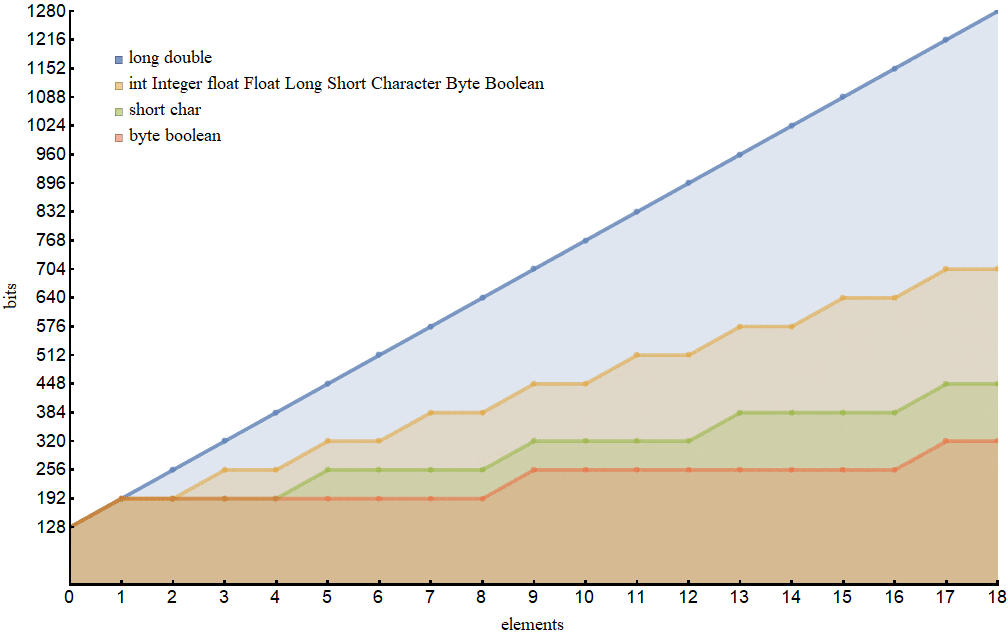
- arrays of the primitive types long and double consume more memory than their wrapper classes Long and Double
- single-element arrays of primitive types are almost always more expensive (except for long and double) than the corresponding reference type.
- For the wrapper classes, the default value is null.
- the reference types might acquire a value (null) that in some sense doesn’t belong to their domains which may cause errors if they didn’t get uninitialized.
- Java language specification doesn’t allow usage of primitive types in the parametrized types (generics), in the Java collections or the Reflection API.
Exceptions in Java
- I learned about:
What Is an Exception?
- An exception is an event, which occurs during the execution of a program, that disrupts the normal flow of the program’s instructions.
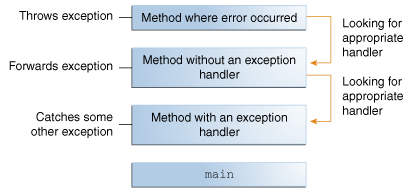
- throwing an exception is Creating an exception object and handing it to the runtime system.
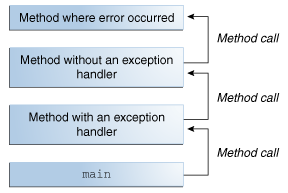
- call stack: the ordered list of methods that had been called to get to the method where the error occurred.
- exception handler: a block of code that can handle the exception
- when the runtime system exhaustively searches all the methods on the call stack without finding an appropriate exception handler it terminates the program
The Catch or Specify Requirement
- a code that might throw certain exceptions must be enclosed by either of the following:
- A
trystatement that catches the exception. - A method that specifies that it can throw the exception. The method must provide a
throwsclause that lists the exception,
- A
- Not all exceptions are subject to the Catch or Specify Requirement.
- The Three Kinds of Exceptions
- checked exception: a well-written application should anticipate and recover from, All exceptions are checked exceptions, except for those indicated by
Error,RuntimeException, and their subclasses - error: exceptional conditions that are external to the application, and that the application usually cannot anticipate or recover from
- runtime exception: exceptional conditions that are internal to the application, and that the application usually cannot anticipate or recover from, indicate programming bugs, such as logic errors or improper use of an API.
- checked exception: a well-written application should anticipate and recover from, All exceptions are checked exceptions, except for those indicated by
- Errors and runtime exceptions are collectively known as unchecked exceptions.
Catching and Handling Exceptions
- FileWriter constructor: If the file cannot be opened, the constructor throws an IOException.
- ArrayList class’s get method, which throws an IndexOutOfBoundsException if the value of its argument is too small (less than 0) or too large (more than the number of elements currently contained by the ArrayList).
- he compiler prints an error message about the exception thrown by the FileWriter constructor. However, it does not display an error message about the exception thrown by get the reason is:
- IOException, is a checked exception.
- IndexOutOfBoundsException, is an unchecked exception.
Using Scanner to read in a file in Java
- I learned about:
- Objects of type Scanner are useful for breaking down formatted input into tokens and translating individual tokens according to their data type
- White space characters include blanks, tabs, and line terminators
- close is a method to close it when the Scanner is done.
- To use a different token separator, invoke useDelimiter()
- The ScanSum example reads a list of double values and adds them up
import java.io.FileReader;
import java.io.BufferedReader;
import java.io.IOException;
import java.util.Scanner;
import java.util.Locale;

public class ScanSum {
    public static void main(String[] args) throws IOException {

        Scanner s = null;
        double sum = 0;

        try {
            s = new Scanner(new BufferedReader(new FileReader("usnumbers.txt")));
            s.useLocale(Locale.US);

            while (s.hasNext()) {
                if (s.hasNextDouble()) {
                    sum += s.nextDouble();
                } else {
                    s.next();
                }
            }
        } finally {
            s.close();
        }

        System.out.println(sum);
    }
}
- Locale class is used because the file content for example the period will be a different character in some locales